Murphy's Law states: "Anything that can go wrong will go wrong." This is especially true and especially painful when there is an audience involved.
|
 Heading out to my car the other day, I noticed pigeon spikes on some of the ledges in the parking garage. These spikes are just about the world’s nastiest looking preventive maintenance device. We’re talking strips of four inch long plastic or metal spikes designed to humanely discourage pigeons perching on, in or around a building. As I was driving out, I got to thinking that it might be useful to keep these spikes in mind while preparing a presentation. Heading out to my car the other day, I noticed pigeon spikes on some of the ledges in the parking garage. These spikes are just about the world’s nastiest looking preventive maintenance device. We’re talking strips of four inch long plastic or metal spikes designed to humanely discourage pigeons perching on, in or around a building. As I was driving out, I got to thinking that it might be useful to keep these spikes in mind while preparing a presentation.
Why? You may need to install the rhetorical equivalent of pigeon spikes in your presentation.
Every time you give a presentation, it’s very possible that you’re going to have someone (or even everyone) in the audience disagreeing with, discounting or criticizing what your are presenting. These folks may be acting very much like a flock of pigeons, swooping in, making a lot of noise and pooping all over. When this happens, things can often go very badly.
(Can you sense that a metaphor is about to beaten to death?)
Pigeons are attracted to certain architectural features of a building. The ledges of parking garages for example. These ledges are necessary, integral parts of the structure. You can’t just get rid of the pigeons by just getting rid of the ledges. The same goes for your presentation. Usually, it’s the most crucial content, the content you can’t do without, that will be the most attractive roosting spot for any pigeons in your audience.
I noticed that the spikes weren’t on every horizontal surface or even on every ledge in the garage. Apparently some places are likely to attract the attention of the pigeons, other aren’t. Either the maintenance staff waited and watched to get a sense of which parts of this particular structure the pigeons liked and installed the spikes as needed, or there are people out there who have learned the fine art of thinking like a pigeon and know where they are likely to roost before they even have a chance to do so.
You need to do the same thing with your presentation. Your words, slides, illustrations, ideas or assumptions are all potential places for the pigeons to land and you need to engage in some careful “roost modification.” This involves thinking carefully about how your presentation was received in the past (even if it’s just in rehearsals). It also might require you to try to think like the audience of an upcoming presentation to try to determine what might cause problems.
I’m not talking major changes here. Spikes like the ones I saw in the garage are designed to be virtually invisible and most people probably never noticed them before. Making your talk unattractive for the pigeons to land on might mean doing something as minor as tweaking your word choices. It might be a matter of setting expectations before you even start in with your actual material.
For instance, to statisticians, the word “significant” has a very specific meaning that’s not the same as the layman’s use of term. In every day usage, it usually means “of a noticeably or measurably large amount.” To a statistician it means “probably caused by something other than mere chance.” If you are talking about research results, and there are statisticians in your audience, you better be sure to use the word the right way. If you don’t, you’ll be hearing the flapping wings and dealing with a significant guano cleanup.
Sarah Lacy’s Mark Zuckerberg interview at SXSW is a great recent example of not thinking like the audience. It’s also attracted one of the largest, noisiest, messiest flocks of pigeons ever. Here are some recaps and analysis: Jeff Jarvis, RichardatDELL, RapSpace.tv.
I don’t think I’ll be going out on a limb by suggesting that you wouldn’t want something like that happening to you.
Related Resources
Ian’s Messy Desk: Know Your Audience Before Speaking to a Group — A great list of questions to help you begin to think like your audience.
Lorelle VanFossen makes a similar point only it’s about writing rather than presenting and it involves paper bags at the ballet rather than pigeons in the parking garage: Are You Blogging With Paper Bags and Pinks?
Laura Fitton shares a brief thought about thinking like your audience: Get Inside your Audience’ Heads.
Your Turn
Getting lucky: What did you almost put into a presentation that would, in retrospect, have turned out to be a perfect perch for the pigeons to poop from if you had left it in? Please respond as a comment.
“Try pushing that button!”
Sounds like someone’s Friday might be off to a rough start.
I’m a day or so behind schedule. There’s a somewhat more substantial post in the works and it should be online sometime tonight. This week’s “Friday’s List of What You Might Have Missed” is also going to be delayed and should be up tomorrow.
 On Friday, I linked to a video of stage manager Debbie Williams exhibiting aplomb and presence of mind while fixing Brad Pitt’s malfunctioning microphone during the Idol Gives Back concert. We’ve all seen presenters and stage crew deal with difficult situations, mistakes and disasters. On Friday, I linked to a video of stage manager Debbie Williams exhibiting aplomb and presence of mind while fixing Brad Pitt’s malfunctioning microphone during the Idol Gives Back concert. We’ve all seen presenters and stage crew deal with difficult situations, mistakes and disasters.
What was the single most inspiring example grace under pressure during a presentation that you’ve had the privilege to witness?
Please share your story in a comment to this post.
Bonus points if you can provide some video.
I’m looking forward to reading your stories.
joeyhagedorn.com: Home-built Blu-Ray Laser Pointer — “In a completely dark room it is even possible to see the beam in air…” You definitely don’t want to give one of these to one of the Jedi Knights I wrote about last week.
Businesss Presentations: Unhitch the Technical Glitch — A teleseminar goes wrong. Five suggestions for dealing.
PittWatch:Video Clip of Brad Pitt on Idol Gives Back — Skip to about 0:50 to catch the stage manager’s amazing grace under pressure as she deals with Brad’s microphone malfunction.
Six Minutes: Stop Rehearsing! 3 Critical Things to Do Before Your Speech — Activity 1, “Study the Venue Logistics”, covers some especially important stuff.
..ALex’s Site: Award presentation Mistake — Whoops. (video)
gathering: stuck at registration? — “What do you do as a meeting planner when you’re the only staff member onsite and you get stuck at the registration desk?”
The Sisyphus Chronicles: The Room that Eats Speakers — Looks at ways that a room’s layout can inhibit the speaker’s ability to connect with an audience.
The Projector Blog: 3 Projector Rental Tips — “There are a few things to keep in mind when renting a projector.”
World of Chig: The Show Must Go On — “…if that had happened in an office, you wouldn’t expect the employee to carry on working.” I’m thinking it might have been best to call it a night.
Despite what the title leads you to believe, this isn’t part two of last week’s “letting loose with the laser pointer” post. This week I’m going to talk about how a room’s lighting scheme can render your visuals invisible.
I don’t want to overdramatize the way it went that morning. None of the things that went wrong were that big of a deal. It’s just that I was running a little behind. Everything had been going well. Then one of the laptops failed. There’s nothing quite like getting the much dreaded blue screen of death in this situation. Okay, no problem, we had backups. Switch the bad machine out with a good one. Boots up. We’re good, just a small, unwelcome adrenaline jolt. Who needs coffee?
Not so fast. Now the remote control isn’t working. Jiggle connections, check the dip switches, reboot the laptops, change batteries. Okay, one of those things fixed it. Anyway, the speakers have been prepared to deal with a remote failure during their presentation so we’re good. Everything’s working on the back end. Now it’s time to take care of the rest. In other words, the projector and the actual image I’m projecting.
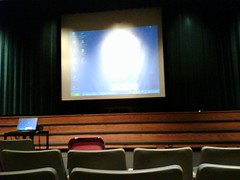 Whoops, when did that happen? At some point, while I was busy putting out those other fires, someone came in and changed the room lighting. We had spent more than a few minutes earlier that morning making adjustments so the room would be be dark enough for the slides to show well, but also bright enough so the audience could take notes and not fall asleep after the lunch break. Unfortunately, The-One-Who-Must-Be-Obeyed (the client team’s head honcho) thought that the room was now too dark and had ordered that some be adjustments made. Problem is, one of the recessed lights that went around the parameter of the ballroom was now shining directly onto the screen, almost completely drowning out and making unreadable anything being projected. It looked a lot like the screen in the picture up there to the right. This issue is not unusual in a ballroom configured with the screen in one of the corners. Earlier, we made a point of turning all these lights off because it seemed that the chandeliers and the wall sconces would provide sufficient light. And since all of those recessed lights were on the same circuit, I couldn’t turn off one without turning off all the others. This particular ceiling was 12 feet high, there was’t a ladder handy and time was getting short. How the heck was I going to deal with this? Whoops, when did that happen? At some point, while I was busy putting out those other fires, someone came in and changed the room lighting. We had spent more than a few minutes earlier that morning making adjustments so the room would be be dark enough for the slides to show well, but also bright enough so the audience could take notes and not fall asleep after the lunch break. Unfortunately, The-One-Who-Must-Be-Obeyed (the client team’s head honcho) thought that the room was now too dark and had ordered that some be adjustments made. Problem is, one of the recessed lights that went around the parameter of the ballroom was now shining directly onto the screen, almost completely drowning out and making unreadable anything being projected. It looked a lot like the screen in the picture up there to the right. This issue is not unusual in a ballroom configured with the screen in one of the corners. Earlier, we made a point of turning all these lights off because it seemed that the chandeliers and the wall sconces would provide sufficient light. And since all of those recessed lights were on the same circuit, I couldn’t turn off one without turning off all the others. This particular ceiling was 12 feet high, there was’t a ladder handy and time was getting short. How the heck was I going to deal with this?
I know what you’re thinking, just break out the BB gun. One quick, quiet “plink”, a little discreet sweeping up. Done.
Unfortunately, that’s one of the few pieces of gear I don’t haul to meetings with me. However, having been in this situation before, I knew of a better solution that would be almost as quick and wouldn’t make the hotel staff nearly so angry. It’s a light bulb changing pole and every hotel with high ceilings should have one.
The call went out to the maintanence department. A few minutes later the offending bulb was removed and we were good to go. Like I said, none of this was particularly earthshaking or heroic. It was just a little more stressful than it needed to be because we were so close to show time.
Now that you’ve seen the light, here are a few things to keep in mind:
- If you get to participate in a pre-meeting site visit (always a good idea), try to get a sense of what the room’s lighting issues might be and begin thinking about how you might deal with them.
- Once you’re on site for the actual meeting, take a few minute to have the staff show you how the room’s lighting controls work. Knowing what the system can and can’t do will often save you a lot of grief. Just as important, you won’t need to waste time searching for the appropriate staff member to make adjustments when time is short.
- Consider getting your hands on your own light bulb changing pole. They are cheap, light and easy to transport. The hotel maintenance staff might not alway be as available for you as they were for me that morning.
- Finally, don’t consider any part of your setup finalized until you’re sure The-One-Who-Must-Be-Obeyed isn’t going to weigh in with some adjustments.
Remember, of all the things you need to control in order to have a successful presentation, light is one of the most important. Especially if the presentation depends on the visuals as much as on what’s being said.
Related Resources:
- Control of Ambient Light: “Controlling ambient light is crucial for maximizing the contrast in the video image. Video has a limited contrast range compared to film, and suffers much worse in the presence of ambient light on the screen.” This page has a good mock up of how ambient light can affect slide readability.
- We usually don’t have much say in what type of screen we will be required to project on. However, picking the appropriate screen for the conditions in a particular meeting space is an art as well as a science. This Wikipedia page will give you a good sense of the many factors involved in this decision.
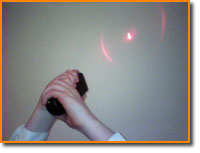 The last presentation before lunch was just getting started and I’m trying to find my copy of the agenda. Since I was the PowerPoint guy at that meeting, my day was pretty much over and I was hanging out with the crew in the control booth daydreaming about the lunch buffet. The technical director’s whispered, but emphatic, “uh oh!” brought me back. “Cover your eyes,” he said “it looks like we have a Jedi Master on stage.” The last presentation before lunch was just getting started and I’m trying to find my copy of the agenda. Since I was the PowerPoint guy at that meeting, my day was pretty much over and I was hanging out with the crew in the control booth daydreaming about the lunch buffet. The technical director’s whispered, but emphatic, “uh oh!” brought me back. “Cover your eyes,” he said “it looks like we have a Jedi Master on stage.”
Huh?
Oh yeah, the speaker. He was rather, well, enthusiastic about using the laser pointer. Back and forth from one corner of the screen to the other. Waving it under every bullet point to underline its importance. Look out, here’s the dangerous part. He forgets to take his thumb off the button as he turns back to the audience. The little red dot slides across the audience like he’s a nervous hit man looking for his target. It’s lucky he doesn’t burn out a couple retinas. Whoops, he’s turning back to the screen. Good thing he’s not a Jedi Knight. That evil Sith lectern would be toast. I could almost hear the sound effects from that scene when Luke…
(sorry, got carried away)
Anyway, I think you see the point. If you’re going to use a laser pointer, use it correctly. Some suggestions:
- Many speakers seem to like holding onto the laser pointer to have something to do with their hands. They are using it as a security blanket. These are often the worst offenders. Try putting the pointer within easy reach on the lectern. It will be there when you need it but you’ll be less tempted to use it when you don’t.
- Make sure the laser light only goes where you want it to. It’s capable of attracting a lot of the audience’s attention, and that attention should be directed only where you need it to be. And never, ever point it toward the audience. (This illustrates another instance of the need for the presenter to control the light. There will be more on that in future posts).
- Make sure your hand is steady. It might be adrenaline, it might be the coffee, it doesn’t matter. It tends to make the audience uncomfortable when the little red dot won’t stay still and it’s clear that your hand is shaking.
- If the laser pointer is part of your remote control, try to get in enough practice with it so you’re less likely to hit the laser pointer button when you’re trying to advance the slides.
- Part of the problem with using the laser pointer is that you usually have to turn, at least partially, away from the audience. This makes it harder to engage them. It can also make it harder for the lectern microphone to pick up what you’re saying. Try to test the stage arrangement out in rehearsal. Can the lectern be turned slightly toward the screen? Can you wear a lavalier to support the lectern microphone?
Related Resources
The breaking of Murphy’s Law is not like robbing a bank, stealing a car or wearing white after labor day. Murphy’s Law is more like the law of gravity. It seems like a constant, like it’s built into the way the world works. It drags you down. You can’t really break it, but you can learn how to plan for it and how to take it into account. You can often keep it from doing damage. A lucky few even manage to escape it completely.
We all learned most of what we know about the law of gravity as a child by falling down and by breaking things. This sort of painful experience is also a way most of us learn about the effects of Murphy’s Law. Luckily for us, it is also possible to learn about how things can go wrong vicariously through the careful observation of other people’s painful experience.
When I was relatively new to the business, the company I worked for did a series of meetings all over the country. Each involved a handful of distinguished speakers, a pile of 35mm slides, a bunch of gear, and a little pipe and drape. There was also a technical crew we had contracted with to run the lights and sound and to make sure it all went together the way it was supposed to do. I was the PowerPoint guy.
My best memories of those days all involve hanging out with the crew and the director, hanging onto every word of every story they told. I learned about what can happen when you don’t measure the hotel’s freight elevator yourself, what needs to go under your mattress when you’re doing a meeting in Florida, and what it means to have a Jedi Knight on stage.
Basically, I was given the privilege of sitting in on an informal seminar taught by seasoned professionals who knew better than anyone what can go wrong and why. Not only were the stories endlessly entertaining, I learned about things going badly in ways I didn’t have the experience to even imagine.
I think everyone also recognized this as an important part of participating in their profession. A trick, tip or technique learned while listening to these stories could be crucial to saving a meeting as well as a career. Sharing your own stories (even the ones you would rather keep to yourself) was expected and strongly encouraged.
That is what I envisioned for this site when I begain working on it. I hope it will grow in to a conversation, a sharing of stories about what can go wrong when you are a presenter (or when you supporting someone else’s presentation). A place where everyone, experienced professionals as well as newbies, can learn how to break Murphy’s Law before Murphy’s Law breaks you.
|